Developer guide
Writing SEO, GEO AI Friendly Code: A Practical Guide for Frontend Developers
Practical HTML, meta, semantics, JSON-LD, Core Web Vitals, and SSR tips so Google and AI crawlers can read your pages, with code and checklists.
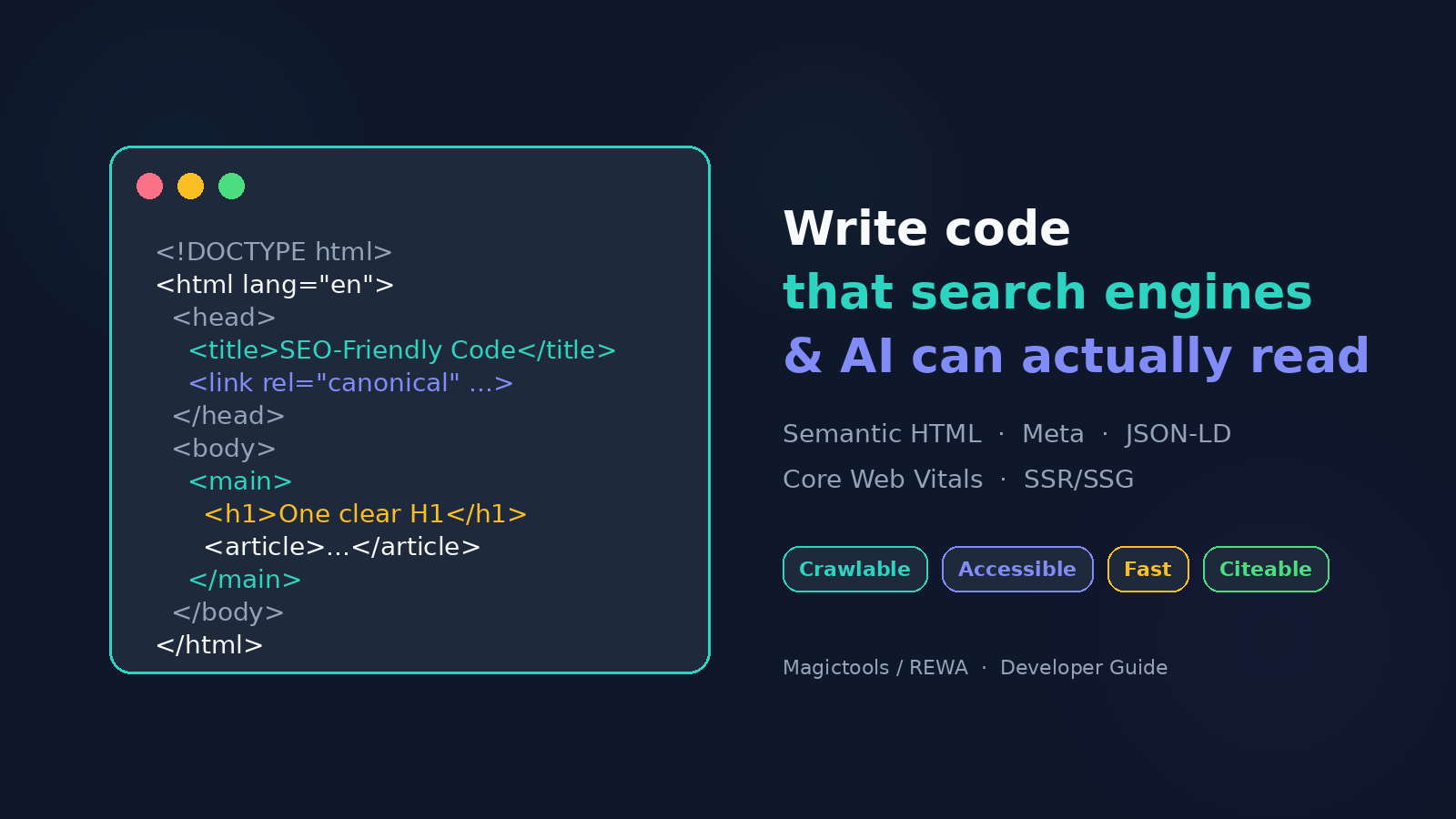
You can write beautiful React components, ship a perfect design system, and still lose search traffic because the HTML that arrives first is empty, ambiguous, or unfriendly to crawlers. Marketers pick keywords. You decide whether Googlebot and a growing set of AI crawlers can find, parse, and trust the page.
This guide is a practical, code-first walkthrough for frontend developers. It focuses on what still works in 2026: semantic HTML, honest metadata, Core Web Vitals, structured data, and HTML that does not depend on JavaScript to exist.
Key takeaways
| Do this | Why it matters |
|---|---|
| Ship meaningful HTML in the first response (SSR/SSG when content must rank) | Many AI crawlers never execute JS; Google’s first look is still HTML |
One clear H1, logical H2→H3, landmarks (header / nav / main / footer) | Document outline for crawlers and assistive tech |
| Unique title, meta description, and canonical per indexable URL | SERP clarity + duplicate consolidation |
Real <a href> links, descriptive alt, width/height, lazy-load only below-fold | Crawl paths, image SEO, Core Web Vitals (CLS + LCP) |
| JSON-LD that matches visible content | Rich results + clearer entities for search and citations |
| Prefer CSP via HTTP headers; treat meta keywords as history | Accurate modern practice, no cargo-cult tags |
Who this is for (and the three SEO pillars)
If you ship HTML, CSS, and JS for marketing sites, docs, blogs, or ecommerce, this is your half of SEO.
SEO still sits on three pillars:
- Technical SEO: structure, crawlability, performance
- Off-page SEO: links, brand mentions, reputation
- On-page SEO: relevance, content quality, intent match
Developers own most of technical SEO and a large slice of on-page implementation. This article stays in that lane: what to put in the markup.
Start the document right
Before / after: document shell
Before (quirks risk + silent language):
<html>
<head>
  <title>Home</title>
</head>
<body>
  ...
</body>
</html>
After (standards mode + language + essentials):
<!DOCTYPE html>
<html lang="en">
<head>
  <meta charset="UTF-8">
  <meta name="viewport" content="width=device-width, initial-scale=1">
  <title>SEO, GEO & AI-Friendly Code | Magictools</title>
  <meta name="description" content="Code-first SEO: semantic HTML, meta tags, JSON-LD, and Core Web Vitals for frontend developers.">
  <link rel="canonical" href="https://example.com/writing-seo-friendly-code">
</head>
<body>
  ...
</body>
</html>
<!DOCTYPE html>first, no BOM, no whitespace ahead of it.langhelps browsers, screen readers, and language targeting.- Charset early (within the first 1024 bytes).
- Viewport is non-negotiable under mobile-first indexing.
Head section that earns the click
Title and description
The <title> is still one of the strongest on-page signals and your SERP headline. The meta description is not a direct ranking factor, but it heavily influences click-through.
| Field | Practical length | Tip |
|---|---|---|
<title> | ~50–60 characters before truncation | Important words first; brand last |
meta description | ~140–155 characters | Write like honest ad copy for one page |
Every indexable template needs unique values. Duplicated "Home" titles across a site are a classic audit finding.
Canonical
When the same content lives at /post, /post/, and ?utm_source=..., ranking signals split. Point to the preferred absolute URL:
<link rel="canonical" href="https://example.com/writing-seo-friendly-code">Self-reference by default. Only canonicalize elsewhere when you intentionally consolidate.
Meta keywords, historical note only
Older Magictools materials mentioned <meta name="keywords">. Google has ignored meta keywords for ranking for many years. Do not spend time stuffing them. Leave them out of new templates.
Open Graph and Twitter cards
Not a ranking factor, but they decide whether a shared link looks like a rich card or a sad bare URL:
<meta property="og:title" content="SEO, GEO & AI-Friendly Code | Magictools">
<meta property="og:description" content="Semantic HTML, meta, JSON-LD, and Core Web Vitals with copy-paste examples.">
<meta property="og:image" content="https://example.com/og/seo-friendly-code.png">
<meta property="og:url" content="https://example.com/writing-seo-friendly-code">
<meta property="og:type" content="article">

<meta name="twitter:card" content="summary_large_image">
<meta name="twitter:title" content="SEO, GEO & AI-Friendly Code | Magictools">
<meta name="twitter:description" content="Semantic HTML, meta, JSON-LD, and Core Web Vitals with copy-paste examples.">
<meta name="twitter:image" content="https://example.com/og/seo-friendly-code.png">
Use absolute image URLs (about 1200×630 works well for large cards).
Semantic body landmarks
headerSite chrome and branding
navPrimary navigation with real links
mainarticleh1 One clear page topic
sectionh2 Thematic chunk with a heading
A page made only of <div>s can look fine to humans and feel like mush to machines. Landmarks label what regions mean:
<body>
  <header>
    <a href="/" class="logo">Magictools</a>
    <nav aria-label="Primary">
      <ul>
        <li><a href="/blog">Blog</a></li>
        <li><a href="/tools">Tools</a></li>
      </ul>
    </nav>
  </header>

  <main>
    <article>
      <h1>SEO, GEO & AI-Friendly Code</h1>
      <section>
        <h2>Why semantics matter</h2>
        <p>...</p>
      </section>
    </article>
  </main>

  <aside aria-label="Related">
    <h2>Related guides</h2>
    <ul>...</ul>
  </aside>

  <footer>
    <p>© Magictools</p>
  </footer>
</body>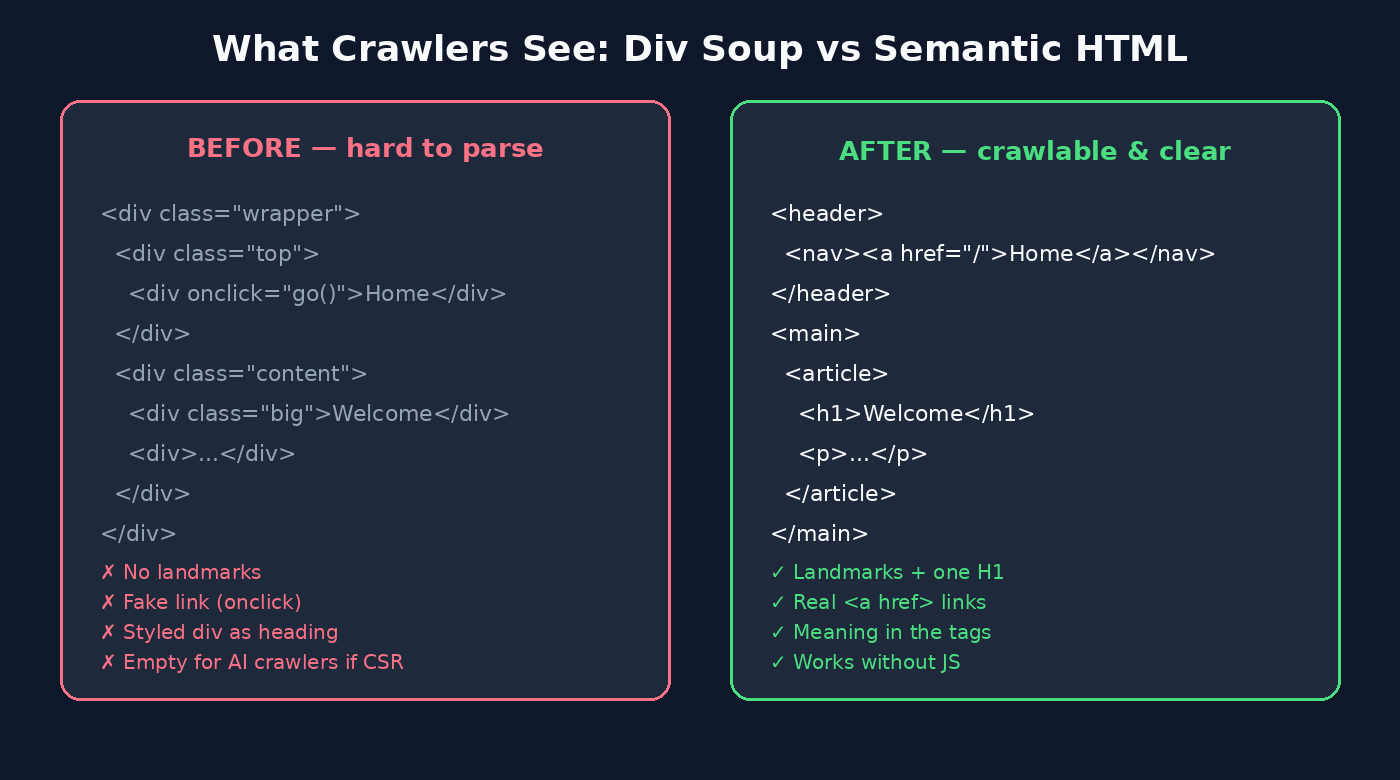
Rules of thumb:
- Exactly one
<main>for the unique primary content. <article>for standalone units (posts, products, docs pages).<section>for thematic chunks that usually have a heading.<aside>for complementary material, not the main story.
Heading hierarchy that reads like a TOC
Headings are the table of contents of your page. Crawlers and assistive tech build an outline from them.
h1SEO, GEO & AI-Friendly Codeh2Head section essentialsh3Title and descriptionh3Canonical and social
h2Semantic body landmarksh3One main element
h2Performance and CWV
Do:
- One H1 that states the page topic.
- Nest H2 → H3 without skipping levels.
- Style size with CSS. Never pick a heading level “because it looks bigger.”
Don’t invent empty H2s for decoration. Use as many sections as the content needs. Five to ten is common on long guides, not a hard law.
Motion alternative: heading hierarchy loop
The outline below tells the same story as the diagram above. It is a short silent loop: h1, then h2, then h3. Levels appear in order and never skip.
Document outline builds like a table of contents
<h1>SEO, GEO & AI-Friendly Code
<h2>Head section essentials
<h3>Title and description
<h2>Semantic body landmarks
<h3>One main, one H1
Never skip levels. Style with CSS. Do not pick a tag because it looks bigger.
Links crawlers can actually follow
Real anchors beat onclick divs
<!-- Weak: invisible to many crawlers as a link -->
<div onclick="location.href='/pricing'">Pricing</div>

<!-- Strong: crawlable, accessible, shareable -->
<a href="/pricing">Pricing plans and features</a>
External new-tab links: keep the security habit:
<a href="https://developers.google.com/search" target="_blank" rel="noopener noreferrer">
  Google Search Central
</a>
URL shape
Prefer hyphens in paths: /seo-friendly-code, not /seo_friendly_code. Internal links should be consistent (casing, trailing slash policy) so you do not invent accidental duplicates.
Descriptive anchor text beats “click here.” Anchor text is a relevance hint for the destination.
Images, video, and lazy-loading without hurting LCP
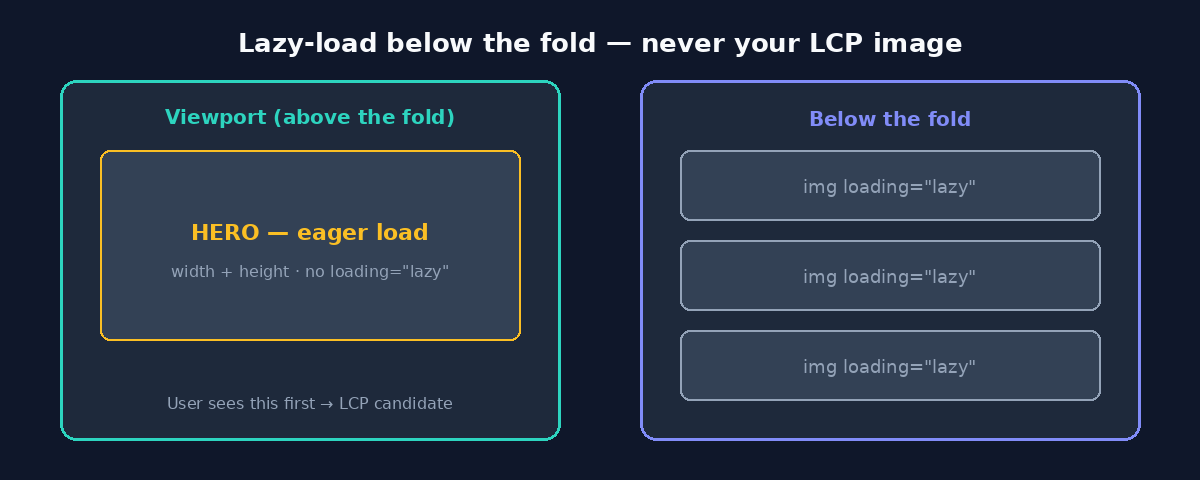
<!-- LCP / hero: eager, sized -->
<img
  src="/hero.webp"
  alt="Diagram of semantic HTML landmarks on a dark code editor"
  width="1600"
  height="900"
  fetchpriority="high"
>

<!-- Below the fold: lazy + sized -->
<img
  src="/diagram-cwv.webp"
  alt="Core Web Vitals cards for LCP, INP, and CLS"
  width="1400"
  height="800"
  loading="lazy"
  decoding="async"
>| Attribute | Job |
|---|---|
alt | Image search + accessibility (use alt="" for pure decoration) |
width / height | Reserve space → protect CLS |
loading="lazy" | Defer off-screen loads, never on the LCP image |
| Modern formats (WebP/AVIF) | Smaller bytes → better LCP |
Compress video; avoid autoplaying heavy media in the initial viewport.
Breadcrumbs, 404s, and site chrome
Breadcrumbs
<nav aria-label="Breadcrumb">
  <ol>
    <li><a href="/">Home</a></li>
    <li><a href="/blog">Blog</a></li>
    <li aria-current="page">SEO, GEO & AI-Friendly Code</li>
  </ol>
</nav>
Pair visible breadcrumbs with BreadcrumbList JSON-LD when you want rich trails in search.
Custom 404
A useful 404 keeps humans on-site and clarifies the error:
<main>
  <section>
    <h1>404: Page not found</h1>
    <p>That URL doesn’t exist. Try the <a href="/">home page</a> or our <a href="/blog">blog</a>.</p>
  </section>
</main>
Return a real 404 status. A soft-200 “not found” page confuses indexing.
JavaScript: async, defer, and why SSR/SSG still win
<!-- Independent third-party: order less critical -->
<script src="https://example.com/analytics.js" async></script>

<!-- App code that needs the DOM, in order -->
<script src="/js/app.js" defer></script>| Attribute | Behavior | Use when |
|---|---|---|
async | Runs when ready (order not guaranteed) | Standalone scripts |
defer | Runs after parse, in document order | DOM-dependent bundles |
neither (in <head>) | Often blocks parsing | Avoid for large app JS |
Rendering choice (SEO decision)
Need this URL indexed?
- No, it is a private app. Client-side rendering is fine.
- Yes, and the content is in the first HTML. Good for Google and AI crawlers.
- Yes, but the page is an empty shell until JavaScript runs. Add SSR, SSG, or prerender.
Google can execute JavaScript, but rendering is a second pass with no guarantee of timing. Many other crawlers, including major AI bots, read raw HTML only. If the sentence you care about is not in view-source:, assume some bots never see it.
Quick sanity check:
curl -sL "https://your-site.com/important-page" | grep -i "a unique phrase from the page"JSON-LD structured data
Google recommends JSON-LD. Mark up what users can see; match the most specific Schema.org type.
<script type="application/ld+json">
{
  "@context": "https://schema.org",
  "@type": "Article",
  "headline": "Writing SEO, GEO AI Friendly Code: A Practical Guide for Frontend Developers",
  "author": [
    { "@type": "Person", "name": "Tariqur Rahman" }
  ],
  "datePublished": "2026-10-17",
  "image": ["https://example.com/assets/hero-seo-friendly-code.png"],
  "mainEntityOfPage": {
    "@type": "WebPage",
    "@id": "https://example.com/writing-seo-friendly-code"
  }
}
</script>
Validate with Google’s Rich Results Test before launch. FAQ blocks on this page can use FAQPage schema when the Q&A is visible in HTML.
Core Web Vitals as frontend SEO
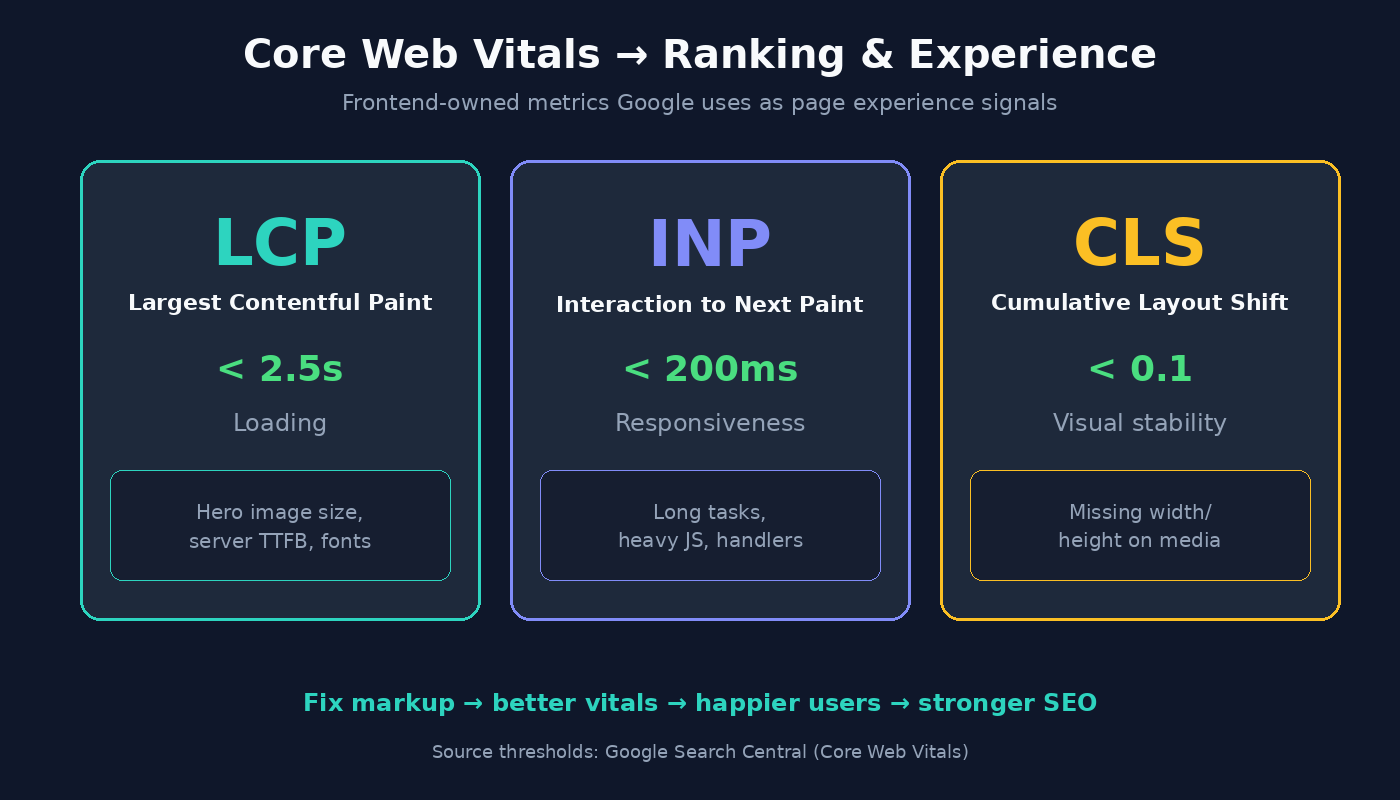
LCP
Loading · aim for 2.5s or less
Sized images. Do not lazy-load the hero.
INP
Responsiveness · aim for 200ms or less
defer or async, and less main-thread work.
CLS
Stability · aim for 0.1 or less
width, height, and a stable font strategy.
- LCP: strive ≤ 2.5s
- INP: strive ≤ 200ms (INP replaced FID)
- CLS: strive ≤ 0.1
Your <img width height>, font loading, and script strategy are SEO work, not “just performance.”
Preload carefully when it helps LCP:
<link rel="preload" href="/fonts/inter.woff2" as="font" type="font/woff2" crossorigin>Critical CSS and non-blocking stylesheets reduce render delay; don’t preload everything “just in case.”
Security: CSP without shooting SEO in the foot
Some teams still use CSP via meta. That can work for simple policies, but prefer the Content-Security-Policy HTTP header. Meta CSP cannot express some directives (notably frame-ancestors) and is easier to misconfigure in shared templates.
Content-Security-Policy: default-src 'self'; img-src 'self' https: data:; script-src 'self'; style-src 'self' 'unsafe-inline'If you must use meta during prototyping:
<meta http-equiv="Content-Security-Policy"
  content="default-src 'self'; script-src 'self' https://apis.example.com">
Don’t accidentally block resources crawlers or users need (CSS, images, and JSON-LD in HTML are fine; they are not executed as script the way app JS is).
HTML that search and assistants can read
Generative engines and AI assistants increasingly fetch or cite web pages. Public measurements (e.g. analyses summarized by Vercel/MERJ and follow-on studies through 2025–2026) consistently show that many AI crawlers do not execute JavaScript. They see the HTML your server returns.
Practical GEO-minded habits (no fake “GEO scores”):
- Put primary content, headings, and links in the initial HTML.
- Keep titles, descriptions, and JSON-LD in that HTML, not only injected client-side.
- Avoid relying on Shadow DOM or client-only tabs for the only copy of key facts.
- Test with
curl/ “view source,” not only the DevTools Elements panel.
Semantic structure and clear entities (Organization, Article, FAQ) make passages easier to quote. That is the entire modest GEO pitch: be readable without a JS runtime.
Decision flow
Start with a new page template.
Unique title, description, and an absolute canonical. Add them before anything else.
One H1, landmarks, and real links. Replace div soup and onclick navigation.
Images have width and height, and the hero is not lazy-loaded.
Public content is in the first HTML. Otherwise use SSR, SSG, or prerender.
JSON-LD matches the visible content when the page needs Article, Product, or FAQ.
Check LCP, INP, and CLS, then ship and verify in Search Console.
ASCII cheat sheet: div soup vs semantic
DIV SOUP                         SEMANTIC
────────                         ────────
div.wrapper                      header > nav > a[href]
  div.nav (onclick)              main
  div.content                      article
    div.big-text  ← fake H1          h1
    div                              section > h2 > p
  div.footer                     footer
FAQ
Does writing SEO-friendly code still matter if we use a modern JS framework?
Yes. Frameworks do not absolve you of HTML quality. Use SSR/SSG/prerender for public pages, keep unique meta tags per route, and ensure navigation uses real links.
Should I include the meta keywords tag?
No for Google ranking. It is historical. Focus on title, description, canonical, and content.
How many H1 tags should a page have?
Prefer one clear H1. Google has said multiple H1s won’t “break” a page, but a single H1 remains the cleanest signal for humans and AI outline extraction.
Do AI crawlers run my JavaScript?
Often no. Treat raw HTML as the source of truth for citation-critical content. Googlebot can render JS; many AI bots currently do not.
Is lazy-loading all images a best practice?
No. Lazy-load below-the-fold images. Keep the LCP candidate eager and always set dimensions.
Should CSP be a meta tag?
Prefer HTTP headers. Use meta only when headers are unavailable, knowing some directives won’t apply.
Where should JSON-LD live?
In a <script type="application/ld+json"> block in head or body. Google accepts both; keep it accurate and visible-content-aligned.
Ship checklist (printable)
Use Print checklist for a paper or PDF copy.
Document & head
<!DOCTYPE html>andlangset- Charset + viewport present
- Unique
<title>(~≤60 chars visible) - Unique meta description (~≤155)
- Absolute self-canonical (when indexable)
- OG + Twitter card tags with absolute image URL
- No reliance on meta keywords
Body & semantics
- One
<main>, sensibleheader/nav/footer - One clear
<h1>; H2/H3 outline without skips - Navigation and in-content links are real
<a href> - Hyphenated, consistent public URLs
Media & performance
- Informative images have descriptive
alt widthandheight(or equivalent aspect-ratio reserves)- Hero / LCP image not
loading="lazy" - Scripts use
defer/asyncappropriately - LCP / INP / CLS within good thresholds on mobile
Discoverability & trust
- Important copy present in first HTML (SSR/SSG if needed)
- JSON-LD validated (if used)
- Breadcrumbs where hierarchy helps
- Custom 404 with real 404 status
- CSP via headers (preferred) without blocking critical assets
- A robots.txt and sitemap that allow and list what you want crawled
Crawler-readable content
curl/ view-source shows the sentences you want cited- No critical facts only inside client-only widgets
Tools from Magictools
When you are ready to operationalize the checklist:
- Robots.txt generator: draft allow and disallow rules without guesswork.
- Sitemap generator: keep
lastmodand coverage honest as the site grows. - GEO and AI crawler audit: see the raw HTML popular AI bots are likely to receive, so you are not surprised by an empty shell.
- SEO, GEO and AI audit: check metadata, structure, entities, and citation readiness on one public page.
Closing
SEO-friendly code is not a bag of secret tags. It is courtesy to machines: clear language, clear outline, clear links, honest metadata, fast paint, and HTML that exists before JavaScript wakes up. Do that, and you help Google rank you, help users trust you, and help AI systems cite you without inventing what your page never said.